I have been using BSNL 3G for two weeks now and I must admit that I have become a fan of this service.
Speed:
The upload and download speeds were acceptable compared to the advertised speeds. The speed of the connection highly depends on the network strength, simultaneous number of users connected and any interferences.
While indoor the speeds were around the 1.5 Mbps mark. The video below was recorded on my terrace around 8 PM in the night.
As can be seen the speed is pretty impressive.
Coverage:
The network coverage also is pretty good. I was able to get strong signals even in the outskirts of pondicherry. On the entire stretch from Pondicherry to Chennai there were only a few places without 3G signals. Still you will have the 2.5G EDGE network to fall back in these situations.
Sunday, September 19, 2010


Saturday, September 18, 2010
BSNL 3G configuration
After you activate your service either by getting a new 3G SIM or upgrade your old 2G SIM, follow the steps below to set yourself up for 3G.
First confirm your handset is 3G capable.
Automatic configuration:
Send a SMS to 58355 in the following format:
MAKE MODEL
eg: For my N900 the message to be sent will be :
NOKIA N900
You should receive a series of Configuration SMS messages . Accept them with PIN 1111
Now you must be all set to use the 3G network. When you are connected to the network your signal level indicator should be ideally showing 3.5 G indicating you are connected at 3G speeds.
If not cross check whether your network mode under Settings->Network is set to 3G or DUAL or something similar.
Manual Configuration (Which worked for me).
Create a New Access point with access point name as : bsnlnet
All other configuration details can be left blank.
This worked like a charm for me.
For Data vouchers and online recharge coupons go here
First confirm your handset is 3G capable.
Automatic configuration:
Send a SMS to 58355 in the following format:
MAKE MODEL
eg: For my N900 the message to be sent will be :
NOKIA N900
You should receive a series of Configuration SMS messages . Accept them with PIN 1111
Now you must be all set to use the 3G network. When you are connected to the network your signal level indicator should be ideally showing 3.5 G indicating you are connected at 3G speeds.
If not cross check whether your network mode under Settings->Network is set to 3G or DUAL or something similar.
Manual Configuration (Which worked for me).
Create a New Access point with access point name as : bsnlnet
All other configuration details can be left blank.
This worked like a charm for me.
For Data vouchers and online recharge coupons go here
BSNL 2g to 3g migration - Official Document
BSNL 3G can be activated as per the link given below. I really find it amusing that a detailed document on how to activate 3G is not posted right on the homepage of the 3G home page of BSNL.
I had to dig in a lot to get this and though of posting this here so that others may not go thru the hassles i went thru.
I had to dig in a lot to get this and though of posting this here so that others may not go thru the hassles i went thru.
Tuesday, November 27, 2007
Free VOIP calls to US land lines and Mobile phones
Recently stumbled upon this service that offers free VOIP calls to US telephone numbers. Please note that this would still cost you in the form of tariff levied by your broadband provider. No worries for those who have an unlimted Plan.
Download iCall from the Link below
Install it
Register with a UserName and Password.
Now you are all set to call your near and dear ones in the US absolutely free.
I tried calling a friend of mine and the voice quality was comparable if not better than a normal telephone line.
http://www.icall.com/download.php
The down side is every call is limited to 5Min.
Download iCall from the Link below
Install it
Register with a UserName and Password.
Now you are all set to call your near and dear ones in the US absolutely free.
I tried calling a friend of mine and the voice quality was comparable if not better than a normal telephone line.
http://www.icall.com/download.php
The down side is every call is limited to 5Min.
Connecting to the internet using Motorola phones as a USB modem
This is a step by step procedure for getting your motorola phone installed as a USB modem and connect to the internet from your PC
Configuring the Modem::
1.Connect your phone to the PC using the USB cable.
2.The new device found wizard starts and Use the drivers from here. http://developer.motorola.com/docstools/USB_Drivers/Handset_USB_Driver/ (if this doesnt work for you, let me know and i will send you the driver which i have)
The phone gets detected as a modem.
3.Now goto control panel => Phones and Modems => Modems Tab => properties => Diagnostic tab
4.Click on Query Modem to check if your modem is properly working.
5.Go to Advanced tab and in the Extra Initilization command text box type at+cgdcont=1,"ip","gprssouth.cellone.in" . Do replace gprssouth.cellone.in with your access point name. gprssouth.cellone.in is specific for south zone BSNL subscribers.
Creating The Dial up Netwotking (DUN) connection for your internet connection::
Control Panel => Network Connections => Create a New Connection => click Next => select Connect to the Internet => click Next=> Select 'Setup Connection Manually' => click Next => select Connect using a dial-up Modem => click Next => Give some ISP Name => click Next => Typy Phone mumber to dial as *99# => click Next => Give your username and password (for BSNL it is usally 91
Thats it. You are done. Now locate the short cut in your desktop and run it. Click dial in the window to connect.
Tuesday, September 04, 2007
Panasonic Lumix DMC-FZ50
Finally -- Got my Digital Camera, a Panasonic Lumix DMC-FZ50. This camera can be classified as a bridge camera, meaning its a bridge between the simple point and shoots and the Digital Single lens-reflex cameras (DSLRs). It exactly looks like a dSLR and for the matter even feels like a dSLR and makes you feel like a professional.
What mdae me go fot it?
What mdae me go fot it?
- Impressive Leica lens. You would have to spend a couple of thousand dollars to get a lens of such quality otherwise.
- Manual zoom and focus rings.
- Excellent build quality.
- Easy handling
- Hot shoe
- Swivel LCD
- Good movie mode
You can have a look at the complete review of the camera here.
Official web-page here.
Haven't had much exposure with this cam. I will write more about this camera some time later after doing a test run of her.

Thursday, August 30, 2007
தமிழில் எழுதுவது எப்படி?
However good your command over English you always have that crave in you to write your heart out in Tamil. Here is how you can do it:
தமிழில் எழுதுவது எப்படி?
தமிழில் எழுத கீழ்கண்ட இனயதளத்தை கிளிக் செய்யவும்.
Choose tamil as the language from the drop down.
So all the best guyz/galz for happy blogging in Tamil.Tuesday, March 14, 2006
College Garden
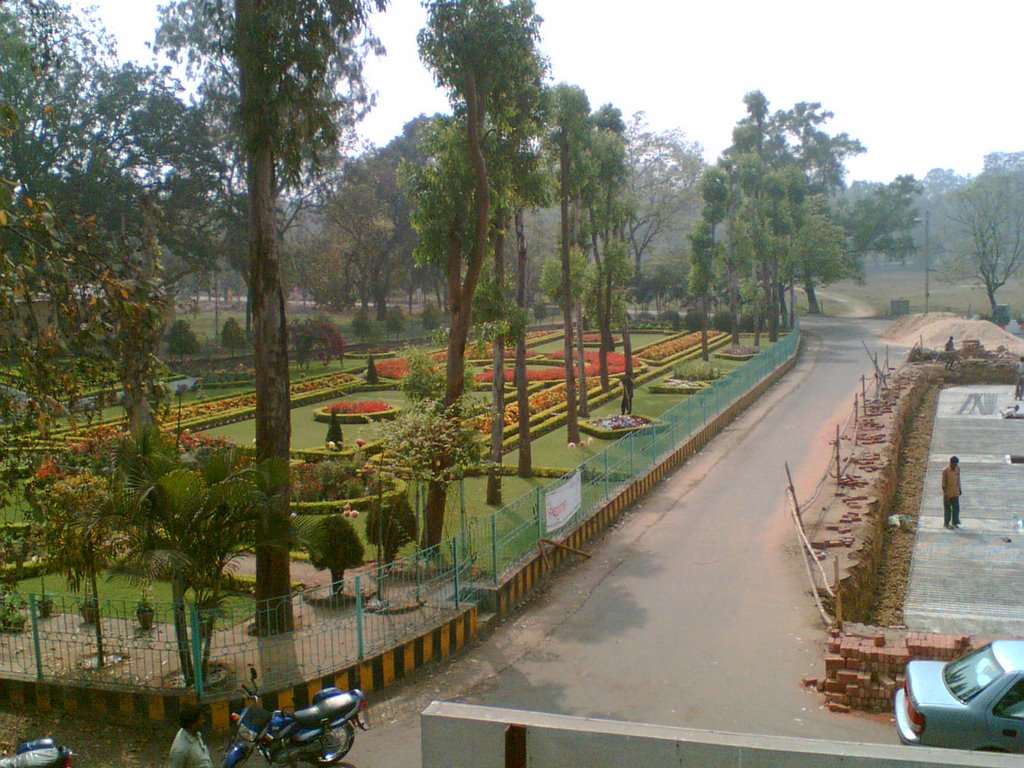
This is one of my best photos or may be the one i like most. Taken with my phone camera(nokia 3230).I got a little impatient when waiting for my friends pre placement talk by IXIA . juz clicked this photo from the first floor window before the assembly hall.The construction work going on is for a fountain.
Monday, March 13, 2006
I AM IN MY HOUSE NOW !!!!
I am in my house now.All credits goes to my micro companions.The typhoid virus.a few guys from the second and third years got too friendly with these little creatures and as a result had to be hospitalised.
And as usual , the guys simply blew it out of proportion to an epidemic level. The added point was that since they were having their mid-sem exams a lot of guys will miss them and this might be a black mark on their marksheets.
But the main aim of these guys were to get holidays and go to their houses.So one fine night the guys gathered outside of their hostels and marched to the directors room.
The director was caught unaware by such a big crowd. And now they demanded the exams be postponed and that holidays be declared for a period of two weeks so as to enable the students to recover from their illness(the true reason being to go to their houses).
The director can logically not refuse.
The first reason :: what if the students got ugly. It was quite a possibility considering the previous instances of similar situations.
the second reason :: if he refuses and if the students take it to higher power , he will come into fire for the poor sanitary conditions in the college.
And that's how we got the holidays.
Now I am in my house happily typing away this post.
Thank you all. Viruses and my juniors alike.
And as usual , the guys simply blew it out of proportion to an epidemic level. The added point was that since they were having their mid-sem exams a lot of guys will miss them and this might be a black mark on their marksheets.
But the main aim of these guys were to get holidays and go to their houses.So one fine night the guys gathered outside of their hostels and marched to the directors room.
The director was caught unaware by such a big crowd. And now they demanded the exams be postponed and that holidays be declared for a period of two weeks so as to enable the students to recover from their illness(the true reason being to go to their houses).
The director can logically not refuse.
The first reason :: what if the students got ugly. It was quite a possibility considering the previous instances of similar situations.
the second reason :: if he refuses and if the students take it to higher power , he will come into fire for the poor sanitary conditions in the college.
And that's how we got the holidays.
Now I am in my house happily typing away this post.
Thank you all. Viruses and my juniors alike.
No sound in quake . Linux
hmmn . I started quake.initialised properly.went to the menu.started a map and it loaded good.but iwas in for a big disapp when I heard no sound. All other apps were working fine.i mean playing sound.
right now I am searching for a solution. I will post it as soon as I find one.
bye.
right now I am searching for a solution. I will post it as soon as I find one.
bye.
finally got my 915g mother board based system running under linux.
finally got my 915g mother board based system running. it was a big relief for me a few days back when i got my system to run under linux. by running i mean everything is working properly.
previously i encountered so many probs.
first virtually no linux ditro had sound support for the HD audio . suse 9.x had only the beta drivers. which u can be assured will not work 90 % of the time.
second thing display. almost all distros defaulted to mesa. and when u use the drivers provided by intel it failed in one way or the other.
worse still some distros won't even recognize my sata hard disk.
debian 3.1 is really a pain in the ass . even their latest release wont see my sata hard disk.
leave alone display and audio.
FINALLY WHEN I WAS LOOSING ALL HOPE....
red hat enterprise linux 4 saved the day.
it detected my SATA disk first.
then my display as 915g.
so much so good.
installation was a breeze.
a reminder to all ::: intsall all development tools and the kernel source in particular.
even the installation progress indicator had a new look. not the classic red hat look.
when everything was over and when it came to the login screen, i was really delighted to see such a clean and sweet looking screen. rhel4 rocks! .
i logged in.
went to the intel site.
got the divers for audio.it was a self installing script. after the install i was disappointed when i heard no sound.
but not for long.it seems that after the install the mixer defaults to mute.
juz increase the volume. and voila.
it was really cool to hear sound from my system.
thats how i got "everything" to work on my systems....
so my suggestion. if u have 915g try red hat enterprise. it really makes a change.
need any help juz IM or mail me.
bye ..
previously i encountered so many probs.
first virtually no linux ditro had sound support for the HD audio . suse 9.x had only the beta drivers. which u can be assured will not work 90 % of the time.
second thing display. almost all distros defaulted to mesa. and when u use the drivers provided by intel it failed in one way or the other.
worse still some distros won't even recognize my sata hard disk.
debian 3.1 is really a pain in the ass . even their latest release wont see my sata hard disk.
leave alone display and audio.
FINALLY WHEN I WAS LOOSING ALL HOPE....
red hat enterprise linux 4 saved the day.
it detected my SATA disk first.
then my display as 915g.
so much so good.
installation was a breeze.
a reminder to all ::: intsall all development tools and the kernel source in particular.
even the installation progress indicator had a new look. not the classic red hat look.
when everything was over and when it came to the login screen, i was really delighted to see such a clean and sweet looking screen. rhel4 rocks! .
i logged in.
went to the intel site.
got the divers for audio.it was a self installing script. after the install i was disappointed when i heard no sound.
but not for long.it seems that after the install the mixer defaults to mute.
juz increase the volume. and voila.
it was really cool to hear sound from my system.
thats how i got "everything" to work on my systems....
so my suggestion. if u have 915g try red hat enterprise. it really makes a change.
need any help juz IM or mail me.
bye ..
Fí®§t þø$T
All my life.i wanted something like this..a blog.. moments... which r supposed to b remembered .... moments which deserve to be thought of again... hhhmnnn .. what am i doing?????
I am supposed to post my first blog.........and am trying to write some nonsense...... enough for the first blog...........
So next time if something really interesting happens.......... iwill do the post...........thats the pledge i take now....no more stupid writings.....
I am supposed to post my first blog.........and am trying to write some nonsense...... enough for the first blog...........
So next time if something really interesting happens.......... iwill do the post...........thats the pledge i take now....no more stupid writings.....
Subscribe to:
Posts (Atom)